
The business card scanner app that reminds you to follow up
Back from a trade show with a pocket full of cards? MarsFlow reads each card on your phone, links the company and reminds you to follow up.
Free for 14 days · then $4.99/month
How it works
From card to contact in three taps
-
Take a photo
Tap the scan icon on the Contacts screen, or start from a new contact or company. Shoot the card with your camera or pick a photo you already took.
-
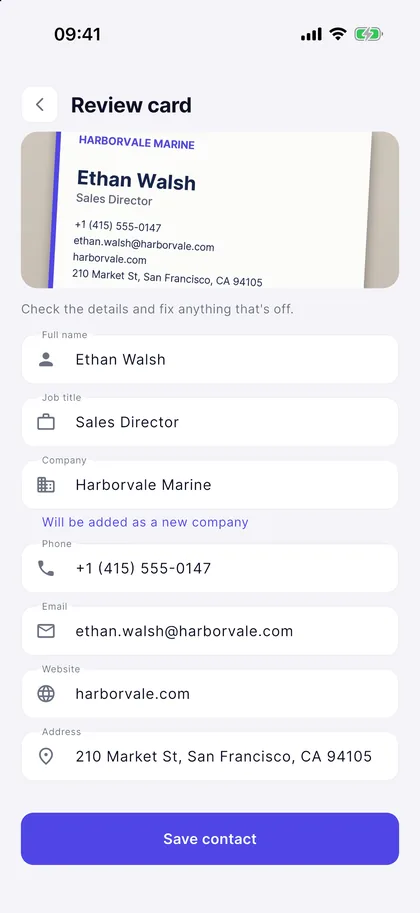
Check the details
Name, title, company, phone, email, website and address fill in by themselves. If anything was misread, fix it before you save.
-
Save
The contact is created and linked to the company. It can also go into your phone’s contacts, with a follow-up reminder three days later.
For a cleaner scan
- Lay the card flat and hold the phone straight above it.
- Use good light; tilt the phone slightly if a glossy card reflects.
- Let the card fill the frame: the less background, the cleaner the result.
- For two-sided cards, scan the side with the contact details.
After the scan
A card that ends up in your work, not in a drawer
Scanning a card is the easy half. The half that wins business is getting back in touch, so MarsFlow keeps the new contact in front of you.
-
The follow-up sets itself
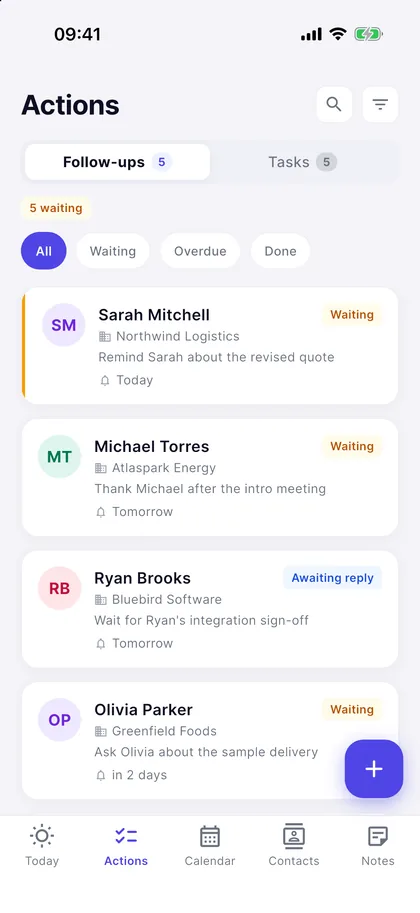
The follow-up option is on when you save: you’re reminded at 10 a.m. three days later. Your follow-ups list shows who to get back to, in order.
- Call, WhatsApp or email with one tap
- Ready-made thank-you and intro messages
- Mark the follow-up done once you’ve sent it
-
Contact and company, linked
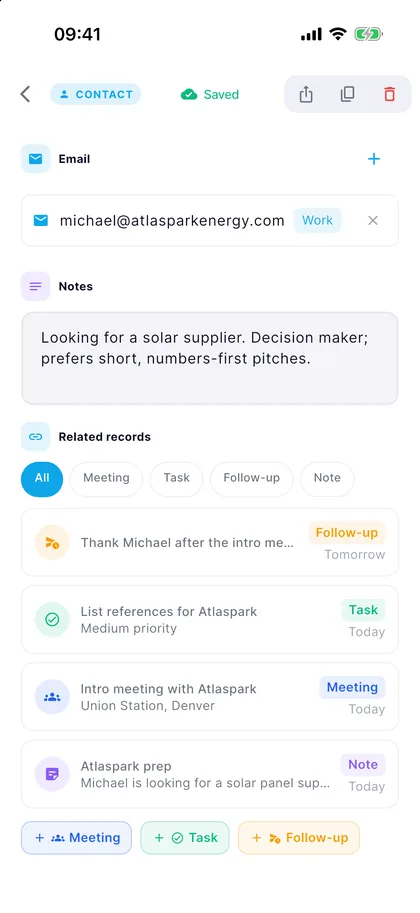
If the company is already in your list, the contact is linked to it; if not, the company is added. Meetings, tasks and notes collect on the same contact card over time.
- Saved to your iPhone or Android contacts too (you can turn this off)
- Not added twice if the number or email is already there
- Add a voice note to the contact after the conversation
Privacy
The card stays on your phone
-
Read on your device
MarsFlow uses Apple’s on-device text recognition on iPhone and Google’s on Android. The photo of the card is never sent to a server.
-
The photo isn’t kept
Once you leave the review screen, the photo is deleted from your phone as well. Only the details you approved remain.
-
Your records stay in the EU
Contacts and companies are stored on servers in Ireland (EU), with security rules that let only you access your data.
Business card scanner FAQ
Is the business card scanner free?
MarsFlow is one subscription with every feature, card scanning included. New subscribers get 14 days free, then it’s $4.99 a month or $39.99 a year (US prices; the store shows your local price). There’s no per-card fee or scan limit.
What does it read from the card?
Name, job title, company, phone numbers (mobile first, then landline; fax numbers are skipped), email, website and address.
Is the photo of the card uploaded anywhere?
No. The text is recognised on your phone and the photo is deleted when you leave the review screen. Only the details you save are stored in your account.
Can it save the card to my phone’s contacts?
Yes. This is on by default and MarsFlow asks for contacts permission the first time. You can turn off “Also save to phone contacts” in Settings. If the same phone number or email is already in your contacts, the person isn’t added twice.
Can I scan several cards at once?
Cards are scanned one at a time, so you can check each one before it’s saved. Each card takes a few taps.
Does it read cards in other languages?
It’s tuned for English and Turkish cards, and cards in other languages that use the Latin alphabet are read as well. Just check the fields before saving.
Do I need an internet connection?
Reading the card happens on your phone. Saving the contact to your account and syncing it to your other devices uses your connection.

Don’t let the cards pile up
Download MarsFlow and scan your first card today. Free for 14 days.
After the trial, $4.99 a month or $39.99 a year. Cancel anytime in your store account.